Browse with TokenPath
Chat with any page, PDF, or YouTube video — and every answer traces back to its exact source. Click a phrase and the sentence behind it lights up in the page, or the video jumps to the moment it was said.
Free to install. New accounts start with 10 million tokens, no card.
Ask a question. Then check the answer.
Three recordings of the extension working — on a page, on a video, and on a follow-up question. The sites being read are invented. Everything the panel does is real.
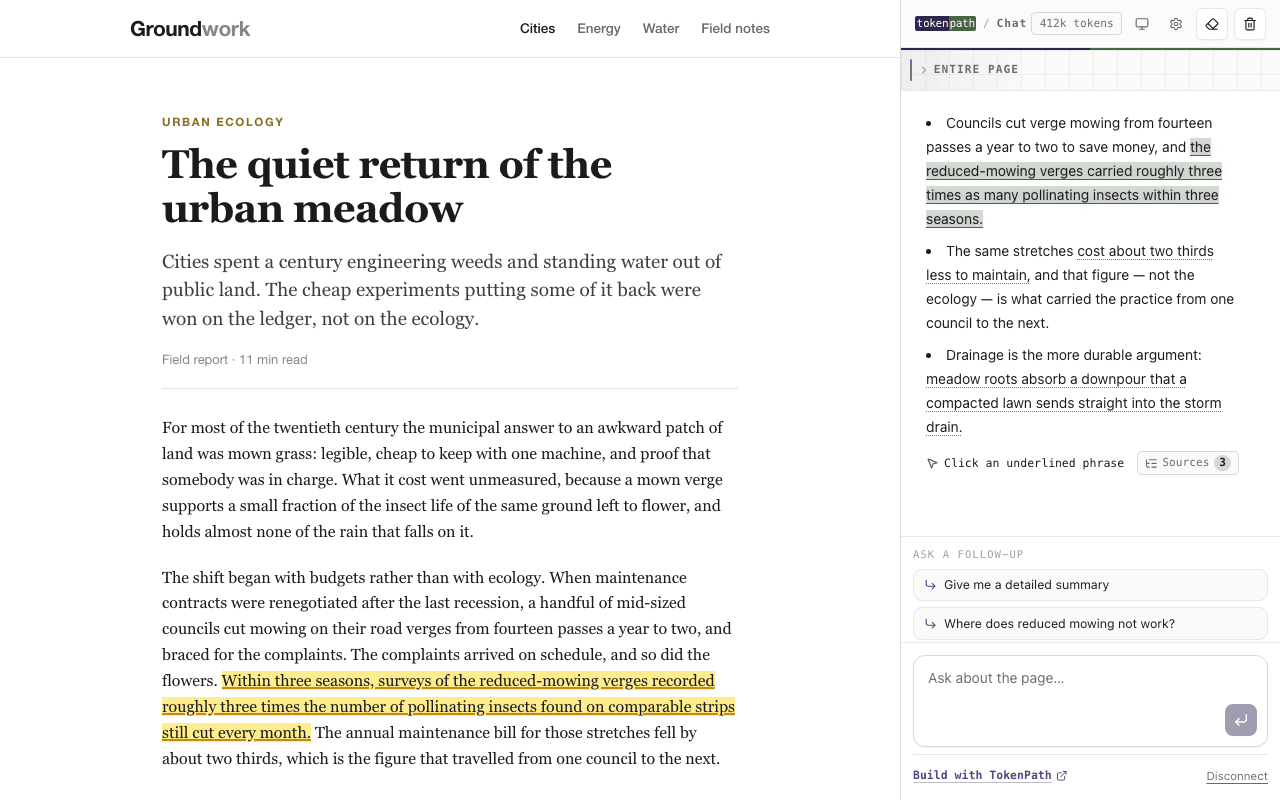
One click, and the answer shows its work
The toolbar button reads whatever you have open. Every underlined phrase is a claim the answer is making — click one and the sentence it came from lights up in the page, wherever that was.
On YouTube, a source is a moment
The capture is the transcript, not the page around it. Clicking an attributed phrase seeks the player to where it was said and names the timestamp it came from.
Follow-ups come from the page
Suggested questions are checked against the text before they are offered, so a chip never asks about something the page never said. Each new answer carries its own sources.
The article, the docs page, the thread. The source lands as a highlight in the page itself.
Papers, filings, contracts — opened in the browser. A citation jumps the viewer to the page it came from.
The captions are the document. A citation is a timestamp, and clicking it seeks the player.
Capture, answer, trace.
Capture
You click the toolbar icon, or select text and ask. Nothing is read until you do — no background collection, no crawling of the tabs you left open.
Answer
The captured text and your question go to TokenPath. A short answer streams back into the side panel, next to what you are reading.
Trace
A second pass measures which parts of the source the answer actually leaned on, and marks them. That is the step other assistants skip.
The tracing step is the same measurement the TokenPath API performs for developers: attention over the source, rolled up into spans, rather than asking a model to cite itself. The method is in How TokenPath works.
$7 a month. 10 million tokens.
The extension subscription is $7 per month and carries 10 million tokens, refilled at the start of every month. A page is a few thousand tokens; a long PDF or a feature-length transcript is tens of thousands.
Extension subscription
- 10M tokens, refilled every month
- Spends only inside Browse with TokenPath
- Cancel from your account at any time
API credits
- Pay as you go, no monthly minimum
- Spends against the API and the playground
- Credits never expire
These are two separate balances. Buying API credits does not top up the extension, and subscribing does not buy credits — the subscription is for reading, the credits are for what developers build. Both are managed from one TokenPath account, with the same sign-in and the same billing page, so running both never means a second login.
Start free. Every new account gets a one-time grant of 10 million tokens before any payment — enough to read your way through a few hundred pages and decide whether the tracing is worth paying for.
It reads a page when you ask it to, and not before.
There are exactly two ways to start a capture: the toolbar icon, or selecting text and choosing TokenPath from the context menu. Switching tabs and scrolling capture nothing. Your chats and your API key stay in the browser's own extension storage, and the extension contains no analytics code and contacts no third-party host. What each request carries, what is kept, and for how long is written out in full in the privacy policy.
Install, sign in, browse.
Install
Add it from the Chrome Web Store. It works in any Chromium browser with side panel support.
Sign in
Connect your TokenPath account from the panel. New accounts start with 10 million tokens, no card.
Browse
Open anything. The panel sits beside the page and stays out of the way until you ask it something.